What Does 12 Point Font Look Like?
Start with the unit. A point is a fixed physical measurement: 1 pt is 1/72 of an inch, so 72 points make exactly one inch. Twelve point font is therefore one-sixth of an inch — 0.167 in, or 4.23 mm — which a web page, at 96 CSS pixels to the inch, shows as 16 CSS pixels.
Those numbers describe the font's em box, the full height set aside for every letter, not the letters you see. Capitals fill only part of it: about 2.8 mm in 12 pt Times New Roman and about 3.0 mm in 12 pt Arial.
Twelve point also shows up in formatting rules. APA Style includes 12-point Times New Roman and 12-point Aptos among its font examples, and the MLA's directions for submitting book manuscripts ask for one font throughout, preferably 12-point Times New Roman. To see 12 pt next to its neighbors, compare the 11 pt, 12 pt and 14 pt rows in the font size examples above; after you calibrate, each one is shown at its true physical size.
Font Point Size Chart: Points to Inches, Millimeters and Pixels
This point size chart converts every size in the font size examples into inches, millimeters, CSS pixels and picas. Sizes from 8 to 72 pt are the presets in Word's font size menu, and 6 and 7 pt cover fine print such as footnotes. Word also accepts any size you type from 1 to 1638 pt in half-point steps, such as 10.5 pt.
| Point size | Inches | Millimeters | Pixels (CSS) | Picas |
|---|---|---|---|---|
| 6 pt | 0.083 | 2.12 | 8 | 0.5 |
| 7 pt | 0.097 | 2.47 | 9.33 | 0.58 |
| 8 pt | 0.111 | 2.82 | 10.67 | 0.67 |
| 9 pt | 0.125 | 3.18 | 12 | 0.75 |
| 10 pt | 0.139 | 3.53 | 13.33 | 0.83 |
| 11 pt | 0.153 | 3.88 | 14.67 | 0.92 |
| 12 pt | 0.167 | 4.23 | 16 | 1 |
| 14 pt | 0.194 | 4.94 | 18.67 | 1.17 |
| 16 pt | 0.222 | 5.64 | 21.33 | 1.33 |
| 18 pt | 0.25 | 6.35 | 24 | 1.5 |
| 20 pt | 0.278 | 7.06 | 26.67 | 1.67 |
| 22 pt | 0.306 | 7.76 | 29.33 | 1.83 |
| 24 pt | 0.333 | 8.47 | 32 | 2 |
| 26 pt | 0.361 | 9.17 | 34.67 | 2.17 |
| 28 pt | 0.389 | 9.88 | 37.33 | 2.33 |
| 36 pt | 0.5 | 12.7 | 48 | 3 |
| 48 pt | 0.667 | 16.93 | 64 | 4 |
| 72 pt | 1 | 25.4 | 96 | 6 |
Every column follows from one fact: an inch is 72 points, 25.4 millimeters or 96 CSS pixels. Divide the point size by 72 for inches, multiply it by about 0.3528 for millimeters, or multiply it by 4/3 for CSS pixels. A pica is 12 points, so 12 pt is exactly 1 pica, 36 pt is half an inch and 72 pt is a full inch. For a size that is not in this font size to inches chart, use the calculator above.
Why Font Sizes Look Different on Screen and on Paper
On paper, a point never changes: print at 100% scale and 12 pt is exactly one-sixth of an inch on any printer. Screens are different. Browsers lay out text in CSS pixels, and CSS defines an inch as 96 of them, but a CSS pixel is a reference unit, not a physical one. Its real size depends on the screen's pixel density, your operating system's display scaling and the browser's zoom level, and a web page cannot find out how big your screen physically is, so it cannot correct for any of that on its own.
That is why the same 12 pt sample looks larger on one screen and smaller on another. Word adds one more variable: its Zoom setting (View > Zoom) only changes how large the page appears on screen. It does not change the font size or the printed size.
So there are only two reliable ways to see the real size: print at 100%, or calibrate your screen against an object of known size, which is what the calibration on this page does. A calibration only fits your screen as it is set up now. If you change the browser zoom, calibrate again, because zooming changes the physical size of every CSS pixel.
How to See Actual Font Size on Your Screen
All you need is a credit or debit card or a ruler, and you only have to calibrate once for each screen and zoom level.
Step 1: Open the calibration panel
Click "Calibrate my screen" in the bar above the font size examples. A panel opens with the outline of a credit card and a slider that makes the outline larger or smaller.
Step 2: Match a credit card or ruler
Hold a credit or debit card against the screen and drag the slider until the outline matches the card's edges exactly. Bank cards are made in the standard ID-1 size of 85.60 × 53.98 mm, so any of them works as a reference.
No card handy? Choose Ruler (cm) or Ruler (inches) and drag until the bar is exactly 5 cm or 2 inches long against a real ruler.
Step 3: Compare the font sizes
Click Done and read down the list. Every row from 6 pt to 72 pt is now drawn at its actual physical size on this screen, so you can compare 12 pt with 14 pt, or any other pair, as they will look on paper.
You can also switch fonts, type your own sample text or try any size. The calibration stays saved in this browser, so the sizes are still true on your next visit.
Step 4: Print the chart to double-check
Click "Print true-size chart" and print at 100% scale. Measure the check line at the top of the printout: if it is exactly 2 inches (50.8 mm) long, the chart printed at true size, and you can hold it next to your screen to compare.
How to Print a Font Size Chart at Actual Size
Paper never rescales, which makes a printed text size chart the most trustworthy font size comparison. Use the "Print true-size chart" button above, or download the ready-made PDF for US Letter or A4 paper.
In the print dialog, set the scale to 100%; some dialogs call it "Actual size". Avoid "Fit to page" and "Shrink oversized pages": both resize the page to suit the paper, and every font size on it shrinks or grows along with it. PDF readers offer the same choices in their print dialogs, so check the scale there too before you print the downloaded chart.
Then check the result with a ruler. The printed chart has a check line above the rows that should measure exactly 2 inches (50.8 mm). If it is shorter or longer, the page was scaled, so print it again at 100%. Once the line is right, every row on the sheet is its true size, and you can hold your own printouts against it to see which size they use.
What a Point Size Actually Measures
A font's point size measures its em box — the invisible body each letter is designed inside — not the height of the visible letters. The em box leaves room for the tallest and deepest parts of the alphabet, so the letters themselves always come out smaller than the size you pick from the menu.
Type designers draw letters on a few horizontal guides. Letters sit on the baseline; lowercase letters such as x reach the x-height, and capitals such as H reach the cap height. Ascenders, as in h and d, rise above the x-height, and descenders, as in g and p, drop below the baseline.
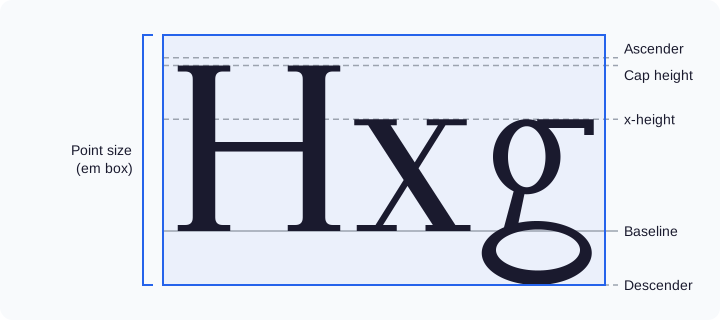
Capital letters usually measure about two-thirds to three-quarters of the point size, and every font divides its em box a little differently. At 12 pt, Times New Roman capitals are about 2.8 mm tall and Arial capitals about 3.0 mm, so Arial looks bigger even though both are exactly 12 pt. Switch the font in the examples above to compare them.
Common Font Size Requirements for School and Work
Size rules come from style guides, instructors, publishers and employers, and they vary. APA Style lists several fonts as examples: 12-point Aptos, 11-point Calibri, 11-point Arial, 10-point Lucida Sans Unicode, 12-point Times New Roman, 11-point Georgia and 10-point Computer Modern. The MLA's directions for submitting book manuscripts to its publications program ask for one font throughout, preferably 12-point Times New Roman. Those directions are written for book authors, so for a class paper, follow your instructor's requirements.
Default settings can surprise you as well. Google Docs starts documents in Arial 11 pt. Word 2007 through Word 2021 use Calibri 11 pt for body text, while Word in Microsoft 365 has switched to Aptos 12 pt. If you move a document between the two apps, check its font and size before you hand it in — and for the layout side of that move, see our guide on how to delete a section break in Google Docs.
FAQ
How big is 14 point font?
14 point font is 0.194 inches, or 4.94 mm, measured as the height of the font's em box; on a web page it equals 18.67 CSS pixels. That makes it one-sixth larger than 12 pt, about 17%, which is easy to notice side by side. Calibrate your screen and compare the 12 pt and 14 pt rows in the font size examples above to see both at their true physical size.
How many inches is 12 point font?
12 point font is one-sixth of an inch, or 0.167 inches. A point is 1/72 of an inch, so 12 ÷ 72 = 0.167 in, and 72 pt makes one full inch. Keep in mind that this is the height of the font's em box, not of the letters themselves: capital letters in a 12 pt font measure only about 2.8 to 3.0 mm.
How big is 12 point font in mm?
A 12 point font is 4.23 mm. One point is 25.4/72 mm, about 0.3528 mm, so 12 × 25.4 ÷ 72 = 4.23 mm. That is the height of the em box; the capital letters are smaller, about 2.8 mm in Times New Roman and about 3.0 mm in Arial. To convert any other size, enter it in the font size calculator above and read the result in millimeters.
Why does text look a different size on screen than on paper?
Because screens measure text in CSS pixels, a reference unit rather than a physical one. How big a CSS pixel really is depends on the screen's pixel density, and your display scaling, browser zoom and Word's Zoom setting all change how large text appears. A web page cannot detect your screen's physical size. On paper, a point is always 1/72 of an inch, so calibrate your screen on this page or print at 100% to see the real size.
Why does my printed 12 pt text measure less than 4.23 mm?
Because 4.23 mm is the height of the em box, which includes room for ascenders and descenders, not the height of any single letter. Measure a capital letter and about 2.8 to 3.0 mm is normal for 12 pt text. If your letters come out smaller than that, check the print settings: the page should print at 100% scale, not with "Fit to page", which resizes everything on the sheet.
Is 12 pt the same size in Word and Google Docs?
Yes. Word and Google Docs use the same point, 1/72 of an inch, so 12 pt is 0.167 inches in both. Text can still look different because the defaults differ, with Google Docs starting in Arial 11 pt and Word in Microsoft 365 in Aptos 12 pt, and because each app shows the page at its own zoom level. Print the same font at the same size from both apps and the letters come out the same size.